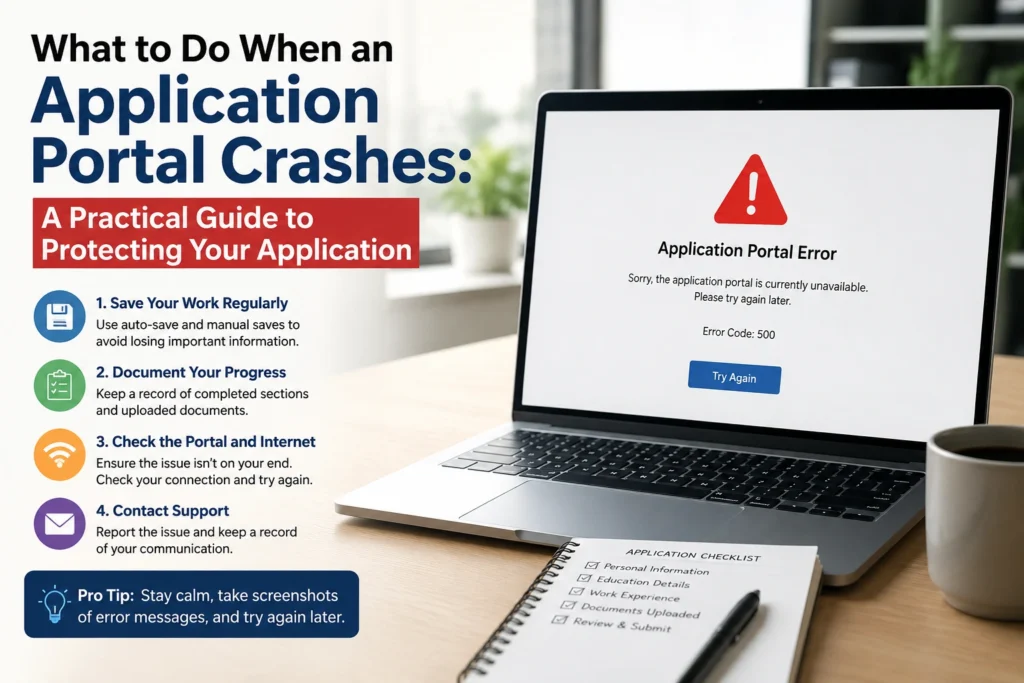

If you’ve ever spent hours preparing an application only for the website to stop working just before you submit it, you’re not alone. Application portal crashes are becoming increasingly common during periods of high demand, especially when bursary, internship, learnership, university admission, or government recruitment deadlines approach.
Few situations are more frustrating than seeing error messages, endless loading screens, or login failures after carefully completing every section of your application. Many applicants immediately assume they’ve lost their opportunity, but in most cases, there are practical steps that can improve your chances of submitting successfully.
Understanding What to Do When an Application Portal Crashes can save valuable time, reduce stress, and even prevent missing an important deadline. Instead of repeatedly refreshing the page and hoping for the best, it’s better to follow a structured approach that minimizes technical problems while protecting your application data.
This guide explains why application portals crash, what actions to take immediately, and how to prepare so future technical issues have less impact on your applications.
What Causes an Application Portal to Crash?
Before looking at solutions, it helps to understand why these systems fail.
Application portals are designed to process thousands of users, but many organizations underestimate how much traffic they’ll receive near the closing date. When too many applicants attempt to access the system simultaneously, the servers can become overloaded.
Other common causes include:
- Heavy traffic before deadlines
- Scheduled website maintenance
- Software updates
- Database errors
- Internet connectivity problems
- Browser compatibility issues
- Temporary server outages
- Security protections triggered by excessive refresh attempts
Sometimes the issue is entirely on the organization’s side. In other cases, the problem may be related to your own device, browser, or internet connection.
Knowing the difference helps you avoid wasting time trying solutions that won’t fix the actual problem.
ALSO APPLY FOR: IMESA Bursary 2027
ALSO APPLY FOR: Glencore South Africa Bursaries 2026–2027
Why This Issue Matters
Application portal failures can have serious consequences.
Many opportunities—including internships, bursaries, graduate programmes, scholarships, government vacancies, and university admissions—have strict closing dates. Missing a deadline by even a few minutes could mean waiting another year before applying again.
Portal crashes also create unnecessary stress. Applicants often panic, repeatedly refresh the page, or restart the application, which may make the problem worse.
Beyond individual applicants, organizations also face challenges when systems fail. Technical problems can reduce trust, increase support requests, and delay recruitment processes.
Learning What to Do When an Application Portal Crashes helps applicants stay calm, protect their work, and respond strategically instead of emotionally.
Step 1: Stay Calm and Avoid Repeated Refreshing
The first reaction for many people is to press the refresh button continuously.
This rarely helps.
Repeated refresh requests may overload the server even more or trigger temporary security restrictions that identify your activity as suspicious.
Instead:
- Wait a few minutes.
- Refresh only occasionally.
- Watch for official updates.
- Avoid opening multiple identical browser tabs.
Remaining patient often produces better results than constant refreshing.
Step 2: Confirm Whether the Problem Is on Your Side
Before assuming the website has crashed completely, check whether the issue affects only your device.
Try the following:
- Open another website.
- Test your internet connection.
- Switch between Wi-Fi and mobile data.
- Restart your browser.
- Restart your computer if necessary.
If everything else works normally while the application portal does not, the problem is likely with the website itself.
Step 3: Try a Different Browser
Some portals perform better on specific browsers.
If you’re using Chrome, try:
- Microsoft Edge
- Firefox
- Safari (Mac)
- Opera
Also consider:
- Clearing cache
- Clearing cookies
- Opening a private or incognito window
- Disabling unnecessary browser extensions
These simple steps often solve loading or login issues.
Step 4: Use a Different Device
If your laptop cannot access the portal, try another device.
Options include:
- Smartphone
- Tablet
- Another computer
- Public library computer
- Internet café
Many application systems are mobile-friendly and may work normally even when desktop browsers experience problems.
Step 5: Save Everything You’ve Already Written
One of the biggest mistakes applicants make is assuming their information has been saved automatically.
Whenever possible:
- Copy every written response into a Word document.
- Save motivation letters separately.
- Keep your CV ready.
- Store certified documents in one folder.
- Save reference numbers.
- Take screenshots of completed sections.
If the session expires unexpectedly, you’ll be able to continue quickly.
Step 6: Check Official Communication Channels
Organizations often acknowledge technical problems.
Check their:
- Official website
- Social media pages
- Email announcements
- Careers page
- Frequently Asked Questions
Sometimes they announce:
- Temporary maintenance
- Extended deadlines
- Alternative submission methods
- Technical updates
Avoid relying on rumours circulating in WhatsApp groups or unofficial social media posts.
Step 7: Contact the Support Team
If the portal remains unavailable, contact the organization’s support team as early as possible.
Include:
- Your name
- Application reference number (if available)
- Time the issue occurred
- Screenshots
- Error messages
- Browser used
- Device used
Providing detailed information allows support staff to investigate more efficiently.
Keep copies of every email you send.
Step 8: Take Screenshots
Screenshots provide useful evidence if technical problems prevent submission before the deadline.
Capture:
- Error messages
- Date and time
- Browser address bar
- Completed application sections
- Submission attempts
If the organization later reviews appeals regarding missed deadlines, screenshots may support your explanation.
Step 9: Monitor Deadline Extensions
When widespread technical problems occur, organizations sometimes extend application deadlines.
This is especially common when:
- Government recruitment systems fail
- University admission portals experience outages
- Large graduate programmes receive exceptionally high traffic
- National bursary systems become overloaded
Do not assume an extension will happen, but continue monitoring official announcements.
Step 10: Submit Early Next Time
The most effective way to avoid portal crashes is simple:
Never wait until the final day.
Many applicants submit within the last few hours, creating enormous spikes in website traffic.
Instead:
- Prepare documents early.
- Complete applications several days before closing.
- Upload files gradually.
- Review information in advance.
- Submit once everything has been checked.
Early applications experience far fewer technical issues.
ALSO READ ABOUT: Career Opportunities in the Northern Cape
What to Do When an Application Portal Crashes During the Final Hour
The final hour before a deadline is usually when servers experience the highest demand.
If this happens:
- Stay calm.
- Save every document immediately.
- Capture screenshots.
- Attempt submission after short intervals.
- Contact technical support.
- Monitor official announcements.
- Keep proof of your attempts.
Avoid creating multiple duplicate accounts unless specifically instructed.
Likewise, do not repeatedly upload the same files dozens of times, as this can increase delays.
Best Practices Experts Recommend
Experienced recruiters and admissions professionals consistently recommend adopting habits that reduce the risk of technical setbacks.
Some of the most effective practices include:
- Start applications several days before closing.
- Keep digital copies of every required document.
- Name files clearly.
- Use stable internet whenever possible.
- Verify file sizes before uploading.
- Read application instructions carefully.
- Save progress frequently.
- Use updated browsers.
- Double-check contact details before submission.
- Keep confirmation emails in a dedicated folder.
Preparation often matters more than technical skill.
Mistakes People Often Make
Applicants sometimes create additional problems during portal outages.
Common mistakes include:
- Waiting until the final few minutes
- Refreshing continuously
- Opening multiple application windows
- Ignoring browser updates
- Uploading files that exceed size limits
- Forgetting passwords at the last moment
- Not saving written responses
- Assuming automatic saving
- Ignoring official support channels
- Deleting confirmation emails
Avoiding these errors significantly improves your chances of completing applications successfully.
Additional Tips to Reduce Future Application Stress
Being organized makes every future application easier.
Create an “Application Folder” containing:
- Updated CV
- Certified ID copy
- Academic transcripts
- Certificates
- Motivation letter template
- Reference contacts
- Passport photo
- Internet backup option
- List of usernames and passwords stored securely
Having these materials ready means you can respond quickly whenever opportunities open.
Frequently Asked Questions
1. Will my application be lost if the portal crashes?
Not necessarily. Some systems automatically save your progress, while others do not. This is why it’s important to keep copies of everything you’ve entered and save supporting documents separately.
2. Should I keep refreshing the application page?
No. Constant refreshing rarely fixes server issues and may increase delays or trigger temporary security restrictions. Wait a few minutes before trying again.
3. What if the deadline passes while the portal is unavailable?
Take screenshots showing the technical problem, contact the organization’s support team immediately, and monitor official announcements. Some organizations extend deadlines after significant system failures, although this is not guaranteed.
4. Is applying early really that important?
Yes. Submitting several days before the closing date greatly reduces the likelihood of encountering overloaded servers, technical errors, or last-minute internet problems.
Final Thoughts
Technical failures can happen to even the most reliable application systems, but they don’t have to end your chances of success. Knowing What to Do When an Application Portal Crashes helps you respond calmly, preserve your work, and maximize your opportunity to submit successfully.
The most effective strategy is preparation. Keep your documents organized, save your work regularly, use reliable internet, and avoid waiting until the final hours before a deadline. If problems occur, document everything, contact the organization promptly, and follow official updates rather than relying on speculation.
By developing these habits, you’ll not only reduce stress during future application periods but also improve your chances of successfully applying for the opportunities that matter most.
ALSO APPLY FOR: IMESA Bursary 2027
ALSO READ ABOUT: Career Opportunities in the Northern Cape
ALSO APPLY FOR: Glencore South Africa Bursaries 2026–2027